
How to Withdraw from Axiom to Coinbase or Binance
Cashing out from Axiom goes through an exchange: send SOL to your Coinbase or Binance deposit address on the Solana network, then sell it there for money in your bank. Axiom itself never pays out to a bank account.
 Updated November 8, 2026
On this page
Why you need an exchange
Axiom is a non-custodial terminal. It trades from a wallet you control, which also means it has no bank rails and no fiat balance to send you. To turn SOL into dollars, euros or dirhams, you move it to an exchange account that is verified in your name and sell it there. The Axiom exchange page lays out the difference.
Get the deposit address on the exchange
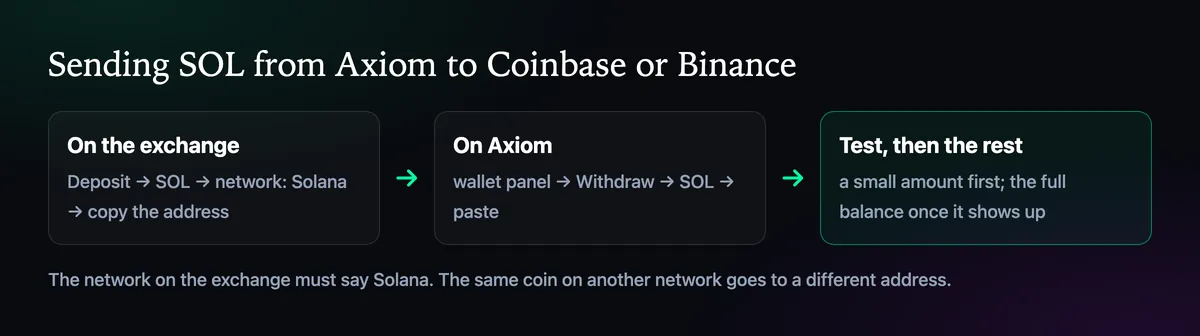
- Coinbase: Receive, choose SOL, make sure the network reads Solana, copy the address.
- Binance: Wallet, then Deposit, choose SOL, pick the SOL (Solana) network, copy the address.
Look for the exchange's minimum deposit while you're on that screen. A test smaller than the minimum may never be credited, which makes a careful test look like a lost one.
Send from Axiom

- Sell any tokens you want to cash out, so the value sits in SOL.
- Click the wallet button at the top right and press Withdraw on the Solana tab.
- Choose SOL, paste the exchange address, enter a test amount above the exchange minimum.
- When the exchange credits it, send the rest.
The transfer itself confirms in seconds. Exchanges then wait for their own number of confirmations, so the balance can take a few minutes to appear. If it hasn't after half an hour, give the exchange's support the transaction signature from Solscan; they can trace it from that.
Before you press Withdraw
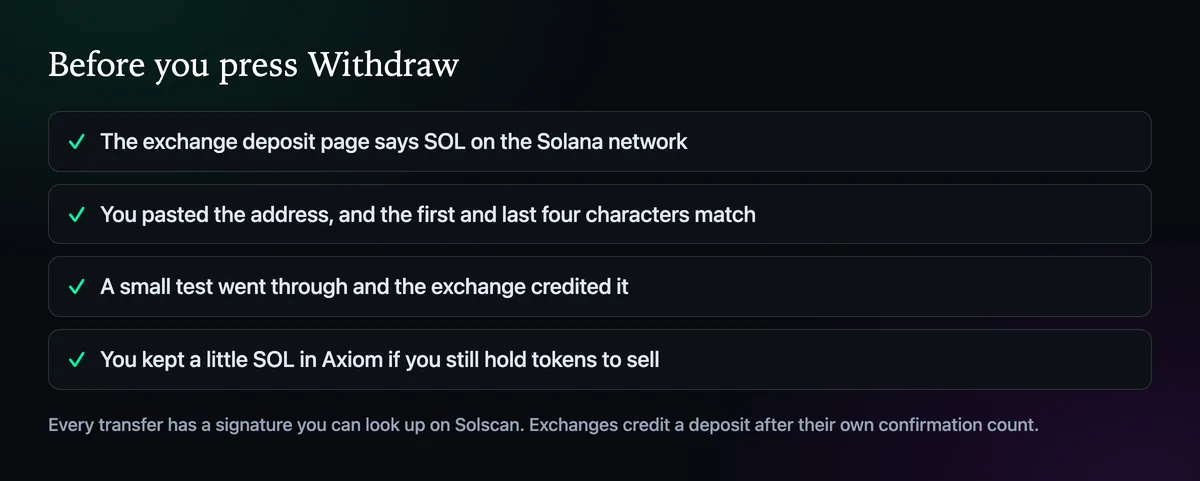
The usual mistake is a mismatched network: the deposit page set to another chain that also lists SOL, or a wrapped version of it. If the address on the exchange starts with 0x, you are on the wrong network for a Solana withdrawal.
Keep a record
Exchanges ask where large deposits came from, and tax authorities may ask what you made. Axiom's Portfolio keeps your trade history and profit per position; save a copy of it before you move everything out, together with the withdrawal signature. If you would rather keep the SOL in a personal wallet first, withdrawing to Phantom works the same way.

Written by Mohammad Shahpari · Web3 CMO, Crypto Growth & SEO Specialist · X · LinkedIn
Did this answer your question?