
How to Create an Axiom Trade Account
Opening an Axiom account takes about two minutes: a login method, a password and a recovery phrase you write down. Here is every screen in order, including the one field most people skip.
 Updated November 6, 2026
On this page
Before you start
Have three things within reach: an inbox you can open right now (or a Google account, or the Phantom extension), a pen and a sheet of paper, and a little SOL or a bank card if you want to trade today. Axiom asks for no ID to open an account. If you can, do the first sign-up on a computer; the recovery phrase is easier to copy from a large screen.
Start on the real site. Type axiom.trade yourself, or open axiom.trade/@tradenow. Search ads for "Axiom" have led people to copies of the site; our page on the official website lists the ones seen so far.
Step 1: Open the sign-up form
On axiom.trade, click Sign up. The form offers three ways in: an email box with its own Sign up button, Continue with Google, and Connect with Phantom. Directly under the email box is a second field labelled Referral code (optional).
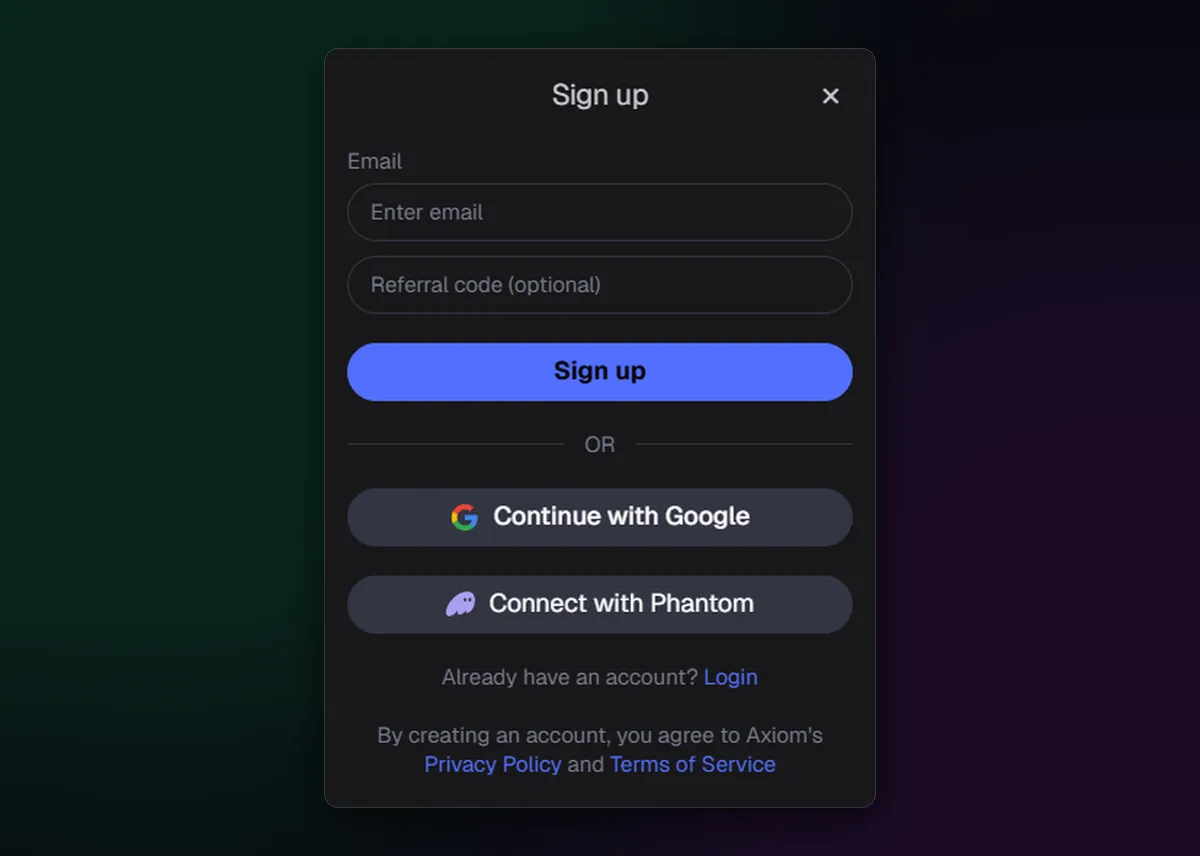
That small box only works now. Axiom attaches a code when the account is created and never afterwards, so this is the moment to type TradeNow: every trade then costs 0.8% instead of 1%, for as long as you keep the account. Opening the form through axiom.trade/@tradenow fills the code in for you; glance at the box to make sure it says TradeNow before you continue. The Axiom Trade invite code page shows the field for each sign-up method.
Step 2: Pick email, Google or Phantom
- Email. Enter the address and press Sign up. Axiom mails a one-time code; paste it into the box that appears. If nothing arrives within a couple of minutes, look in spam and promotions before asking for another.
- Google. Continue with Google opens Google's own window. Choose the account and approve.
- Phantom. Connect with Phantom asks the extension to approve a connection. Open Phantom and type its password first, so the request doesn't get lost behind another window.
Whichever you choose, it becomes the way you log in from now on, so pick one you will still control next year. A work address you could lose with the job, or a Google login shared with family, is a poor key for an account with money in it.
Step 3: Set a password
Axiom then asks for a password. It guards the sensitive corners of the account: revealing your recovery phrase or a wallet's private key later both ask for it. Use one you don't use anywhere else and keep it in a password manager.
Step 4: Write down the recovery phrase
Next comes a 12-word recovery phrase. It is the master key to every wallet on the account: whoever holds those words holds the funds, and Axiom has no way to reset them. Copy the words onto paper in order, numbered, and read them back against the screen. Skip the screenshot. Photos sync to cloud backups, and phone galleries are a favourite place for thieves to look.
The full routine, including how to test your copy, is in How to Back Up Your Axiom Recovery Phrase.
Step 5: Meet your first wallet
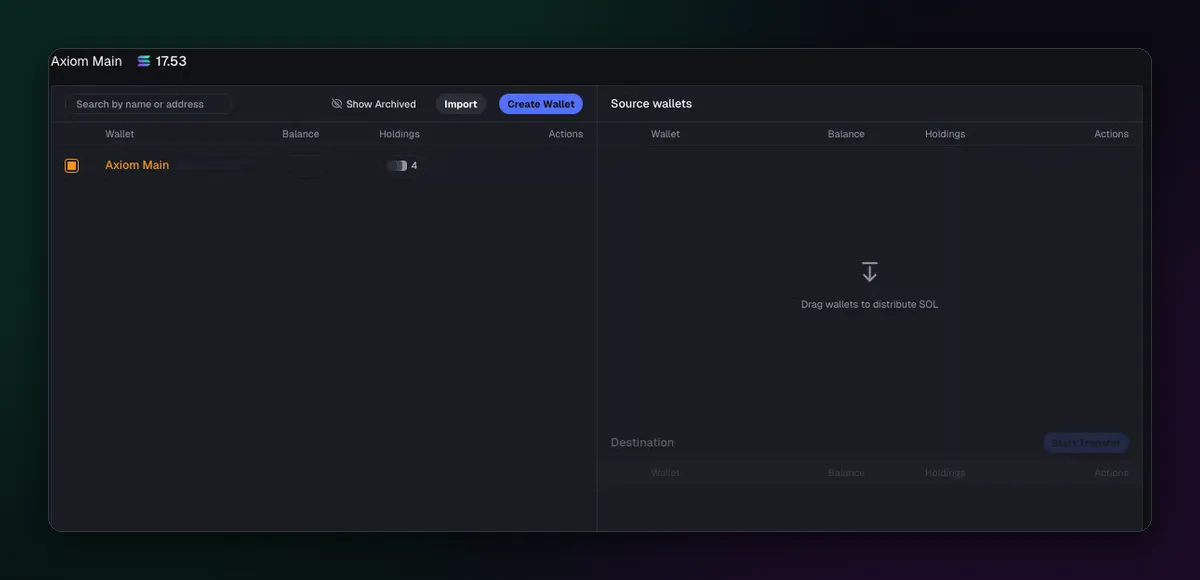
The account arrives with a wallet already in it, labelled Axiom Main. It is non-custodial: the keys sit with Turnkey, not on Axiom's servers, and you can export them whenever you like. The same login also covers the EVM chains Axiom trades, from Base to BNB Chain, so there is nothing else to create before you switch chains. The Axiom wallet guide explains how it works underneath.
Step 6: Add funds
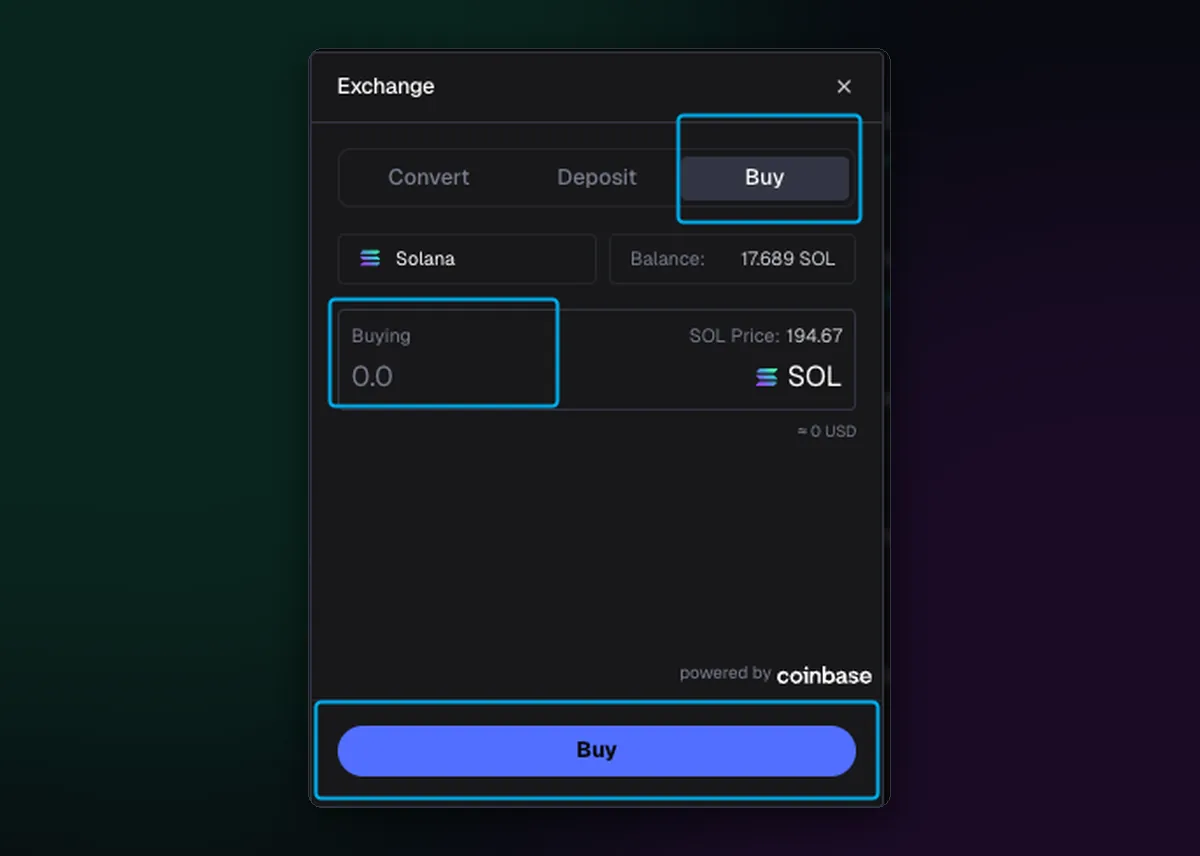
Press Deposit in the top bar. The Deposit tab shows your address for the chain you are on; send SOL to it from an exchange or another wallet, and choose the Solana network when the exchange asks. The Buy tab takes a card through Coinbase, up to $500 a week without identity checks. For learning, 0.1 to 0.2 SOL is plenty; there's no prize for funding big on day one.
The two-minute checklist
- Open axiom.trade from a bookmark or by typing it.
- Enter invite code TradeNow in the Referral code box, or start from axiom.trade/@tradenow.
- Sign up with email, Google or Phantom, and note which one you used.
- Set a password you use nowhere else.
- Copy the 12 words onto paper and store it somewhere safe.
- Deposit or buy a small amount, then try your first trade.

Written by Mohammad Shahpari · Web3 CMO, Crypto Growth & SEO Specialist · X · LinkedIn
Did this answer your question?