

Axiom Trade Support
Axiom Trade support works through one channel: a ticket you open yourself in Axiom's Discord server at discord.gg/axiomtrade. There is no published support email, no phone line and no help over direct messages. This page covers where to go, what to send, and how to spot the many fake "support agents" waiting for people with a problem. New accounts with code TradeNow save 20% on fees.
 Go to Axiom (20% Off)
Axiom Trade Invite Code: TradeNow
The Axiom Trade invite code is TradeNow. Axiom calls it a referral code. Enter it when you sign up and your trading fee drops by 20% for the life of the account, from 1% to 0.8% a trade.
If you are looking for an Axiom Trade invite code, use TradeNow. Type it into the referral field on the sign-up screen, or open axiom.trade/@tradenow and it is filled in for you. It is one of the most used Axiom codes, and it still works.
How do you contact Axiom Trade support?
Join Axiom's official Discord server, discord.gg/axiomtrade, and open a private support ticket there. Axiom's docs say help is given only inside tickets and server channels, and that anyone who sends you a direct message claiming to be support should be ignored.
Staff never ask for your recovery phrase, private key or password, in a ticket or anywhere else.
| Help | Support tickets in discord.gg/axiomtrade |
|---|---|
| Documentation | docs.axiom.trade |
| Announcements | x.com/AxiomExchange |
| Email or phone | None published |
| Direct messages | Never from real support; ignore them |

The Only Real Channels
Axiom keeps its official presence to three addresses, the same three it shows at the end of its own videos: the site axiom.trade, the X account @AxiomExchange and the Discord server discord.gg/axiomtrade. X is for announcements; it is where Axiom posts new chains and features, and where it answered publicly after the February 2026 staff incident. Account problems go to Discord.
Inside the terminal, the bar along the bottom of the screen has Discord, X and Docs buttons, which is the safest way to reach the right server: you never have to search for it.
A Ticket That Gets Answered
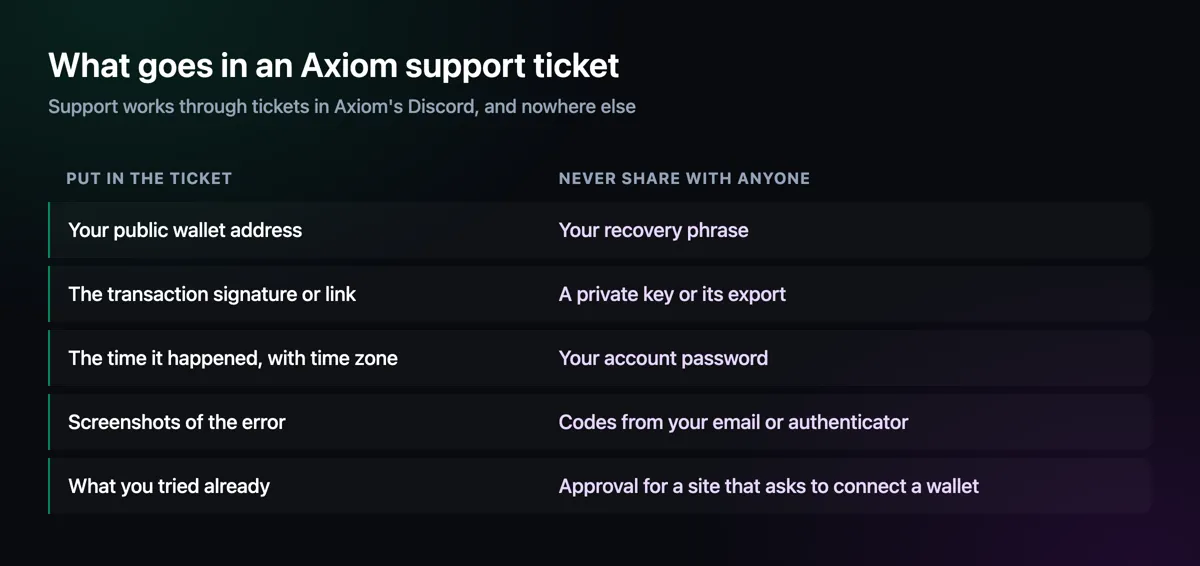
Tickets move faster when staff can see the problem without a back-and-forth. Give your public wallet address, the transaction signature or a Solscan link, when it happened with your time zone, and screenshots of any error. Say what you already tried. Keep everything in one message.
What never goes in a ticket is anything that gives control of your account or funds. The step-by-step version, with screenshots of the Discord menus, is in the guide: how to open an Axiom support ticket.
Fake Support, and How to Spot It
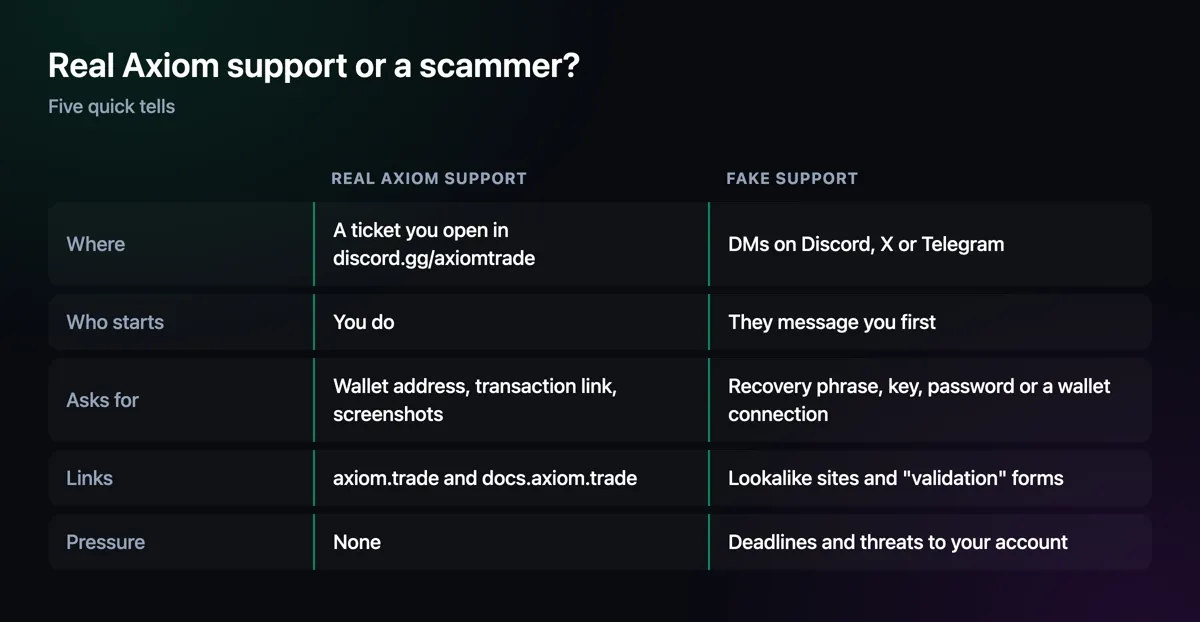
The moment someone posts a problem in a public channel, fake agents message them. They copy staff names and avatars, send links to "validation" or "sync" pages, or ask you to connect a wallet so they can "check" it. Axiom's own docs recommend turning off direct messages from server members for this reason.
Some people search for an Axiom "support code". Axiom's docs mention none. If anyone asks you to enter a code on a website, read one out to them, or connect a wallet to receive help, you are talking to a scammer. Real staff only answer inside the ticket you opened.
Try These Before Opening a Ticket
Many problems have a quick fix. Failed buys usually need a higher priority fee or slippage in your preset, a login that will not work usually means a different sign-in method from the one you used at sign-up, and a missing balance is often on another chain. The Axiom not working page lists the common symptoms, and the guide covers login problems step by step.
Getting Help in Four Steps
Enter invite code TradeNow
New to Axiom? Open the account at axiom.trade/@tradenow, with the code already filled in.
Close your DMs
Turn off direct messages from server members before you post anything in Axiom's Discord.
Open a ticket
Use the server's support channel, and write the whole problem in one message.
Stay in the ticket
Answer only there. Anyone who moves the conversation elsewhere is not Axiom.
Axiom Trade Support — FAQ
How do I contact Axiom Trade support?
Open a private ticket in Axiom's official Discord server, discord.gg/axiomtrade. That is the only support channel Axiom's docs describe.
Does Axiom Trade have a support email or phone number?
No published one. Support runs through Discord tickets; treat any email or phone number offering Axiom support as unofficial.
What is the Axiom support code?
Axiom's docs mention no support code. Anyone asking you to enter, share or receive a code to fix your account is running a scam.
Will Axiom support ever DM me?
No. Axiom's docs say to ignore anyone who messages you directly claiming to be support. Real staff reply only inside a ticket you opened.
Can Axiom support recover lost funds?
Blockchain transfers cannot be reversed, so support can investigate and explain but not undo a transfer. Nobody who promises to recover funds for a fee works for Axiom.
Axiom Trade Guide
Step-by-step help for every part of the terminal, from opening an account to withdrawing, with screenshots from Axiom itself.
Disclaimer
Support details come from Axiom's documentation and official channels, checked on 11 November 2026. Axiom can change how support works; the docs at docs.axiom.trade are the reference. Not financial advice.

Written by Mohammad Shahpari · Web3 CMO, Crypto Growth & SEO Specialist · X · LinkedIn