

Axiom Pulse
Axiom Pulse is the live launch feed at the heart of Axiom: every new token from the launchpads you follow, sorted into three columns by how far along it is, with a quick-buy button on each row. This page is about setting it up well: what each column controls, starting settings for each one, and what to check when the feed looks wrong. With code TradeNow, every buy from Pulse costs 0.8%.
 Open Pulse on Axiom (20% Off)
Axiom Trade Invite Code: TradeNow
The Axiom Trade invite code is TradeNow. Axiom calls it a referral code. Enter it when you sign up and your trading fee drops by 20% for the life of the account, from 1% to 0.8% a trade.
If you are looking for an Axiom Trade invite code, use TradeNow. Type it into the referral field on the sign-up screen, or open axiom.trade/@tradenow and it is filled in for you. It is one of the most used Axiom codes, and it still works.
What is Axiom Pulse?
Pulse is Axiom's real-time feed of new tokens. New Pairs shows coins minutes old, Final Stretch shows coins close to finishing their bonding curve, and Migrated shows coins that just moved to a full trading pool. Each column has its own search, filters, quick-buy size and preset.
One feed covers several chains at once, so a Solana launch and a Robinhood Chain launch can sit in the same list.
| Columns | New Pairs, Final Stretch, Migrated |
|---|---|
| Per column | Search, quick-buy amount, preset P1 to P3, filters |
| Filters | Launchpads, keywords, audit fields such as dev, top 10, snipers and bundles, and metrics |
| Chains | Switch each chain on or off at the top of the page |
| Sharing | Import and export a column's filter set |
| Cost | Free to use; the fee is charged only when you trade |

Inside a Pulse Column
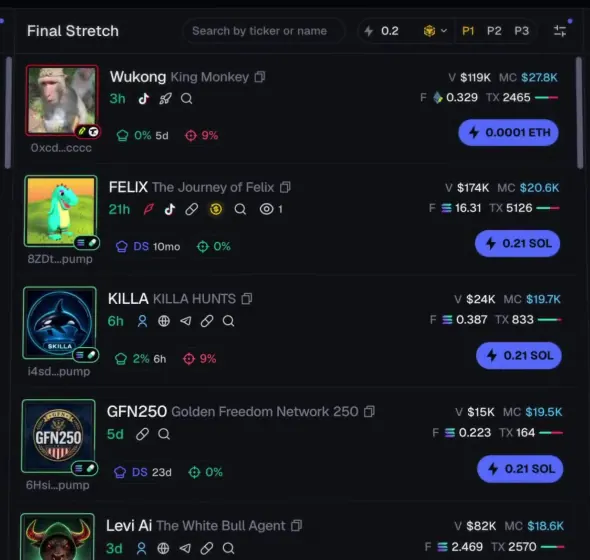
Each column carries its own small toolbar. The search box narrows the list by ticker or name. The lightning figure next to it is the quick-buy amount, in the chain's coin, so a click on any row's button buys exactly that much. P1, P2 and P3 pick which preset the quick buys use, which means the New Pairs column can fire with a higher priority fee than Migrated. The last icon opens that column's filters.
Rows read left to right: the picture and name, the token's age, its social links, and a strip of holder figures such as top 10 share, dev holdings and snipers, with volume, market cap and transaction count on the right. The guide's walk through a Pulse row goes figure by figure.
Best Pulse Settings, Column by Column
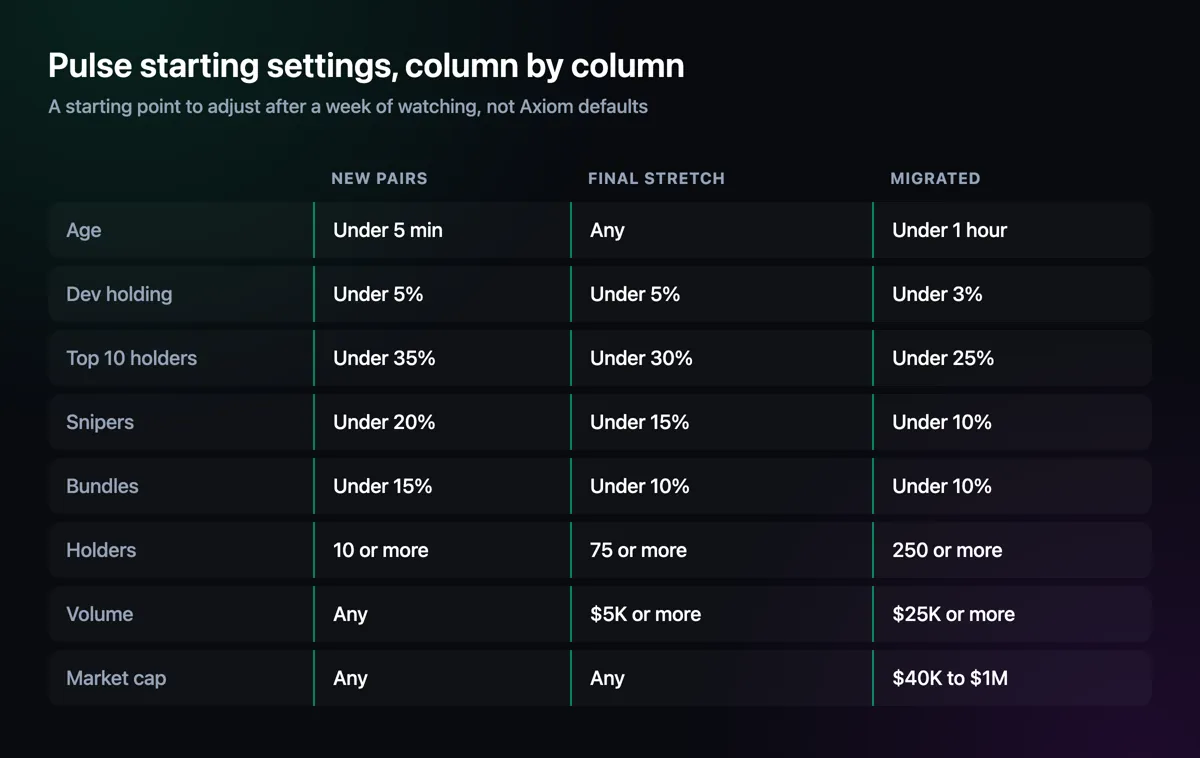
There is no single best setting, because the three columns answer different questions. New Pairs asks whether a coin is worth a small early bet; it needs loose limits or it shows nothing. Final Stretch asks whether a coin will make it to its pool; by then it should have real holders and some volume. Migrated asks whether a coin can keep going in an open market, where tighter holder limits and a market-cap band keep the list readable.
The table below is a starting point we use for Solana launchpads, not a default Axiom ships with. Run it for a week, note which coins you wish you had seen and which ones wasted your time, and move one number at a time. The memecoin sniper page explains what each filter measures.
One Feed for Several Chains
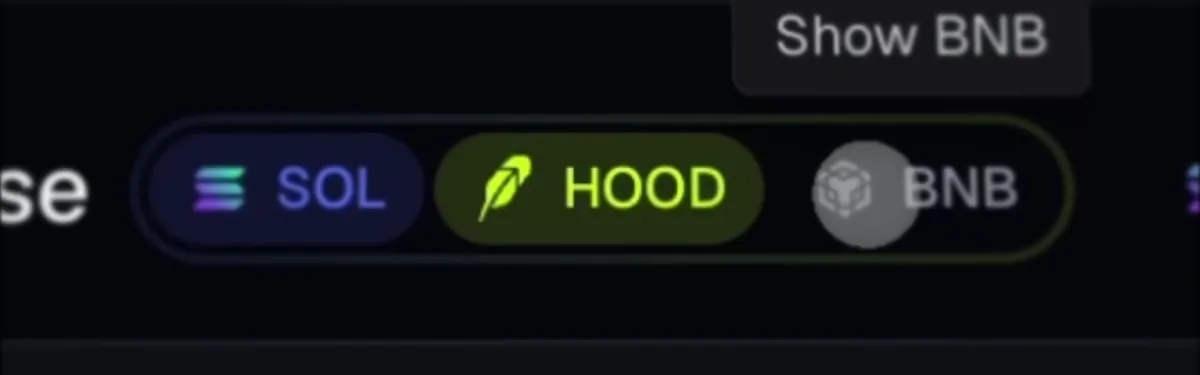
The switches at the top of Pulse turn each chain on or off: SOL, HOOD, BNB and the rest. With more than one switched on, the columns mix them, and each row's quick-buy button shows that chain's coin. Set a quick-buy amount per column with that in mind: 0.2 makes sense in SOL and is a large order in ETH.
Launchpads are chosen inside each column's filters. A busy chain such as Solana can drown out a quieter one, so switch off the chains you are not trading that day rather than filtering harder.
Pulse Filters Not Working? Check These
- The wrong column. Filters belong to one column. A rule set on Final Stretch does nothing to New Pairs; the tabs at the top of the filter panel show which column you are editing.
- A chain switched off. If a chain's switch is off, its coins never reach any column, whatever the filters say.
- A launchpad left out. Coins from a pad that is not selected in the column's filters stay hidden.
- Limits too tight. Strict holder or volume minimums keep a coin out until it clears them, so it appears late or not at all. An empty column usually means this.
- Exclude keywords and blacklists. A word in Exclude keywords, or a blacklisted developer, hides coins quietly.
- An imported filter set. Importing someone else's set replaces yours for that column.
- The browser. Reload the page, and turn off extensions that change web pages; some have been caught stealing Axiom sessions.
Pulse and Other Launch Feeds
Most terminals now have a three-column launch feed; Trojan and Padre call theirs Trenches. What sets Pulse apart is reach: one feed across nine chains, each with its launchpads, and quick buys that use a column's own preset. The Axiom vs Trojan and Axiom vs Padre pages compare the rest.
Setting Up Pulse in Four Steps
Enter invite code TradeNow
Create the account at axiom.trade/@tradenow; the code comes pre-filled, so Pulse buys cost 0.8%.
Choose your chains
Switch on only the chains you fund and trade. Fewer chains means a feed you can read.
Filter each column
Start from the table above, one column at a time, and export each set once it works.
Size the quick buys
Give each column a quick-buy amount and a preset that matches how early it trades.
Axiom Pulse — FAQ
What is Axiom Pulse?
Axiom's live feed of new tokens, split into New Pairs, Final Stretch and Migrated, with filters, a quick-buy size and a preset for each column.
What are the best Axiom Pulse settings?
There is no single best set. Loose limits suit New Pairs, stricter ones Final Stretch, and the tightest plus a market-cap range suit Migrated. Start from a table like the one on this page and adjust one number at a time.
Why are my Pulse filters not working?
Usually a filter set on a different column, a chain or launchpad switched off, limits too strict, an exclude keyword or blacklist, or an imported filter set. Reloading and turning off page-changing extensions fixes the rest.
Can Pulse show more than one chain?
Yes. Switch on several chains at the top of Pulse and their coins share the columns, each quick-buy button priced in its own chain's coin.
Is Axiom Pulse free?
Yes. Watching Pulse costs nothing; Axiom's fee applies only to trades, 0.8% with referral code TradeNow.
Axiom Trade Guide
Step-by-step help for every part of the terminal, from opening an account to withdrawing, with screenshots from Axiom itself.
Disclaimer
Pulse features are described from Axiom's documentation and its own videos. The starting settings are suggestions, not Axiom defaults, and no filter can make a new token safe. Not financial advice.

Written by Mohammad Shahpari · Web3 CMO, Crypto Growth & SEO Specialist · X · LinkedIn