 Trade on Axiom (20% Off)
An everyday wallet
Holding coins, staking SOL, sending money to friends and connecting to any app: Phantom is built for all of it, on phone and desktop.
 Axiom Bot · Solana

Phantom is where most Solana traders keep their coins, and it trades too: swaps in the app, perps on Hyperliquid, and a desktop Phantom Terminal at trade.phantom.com. Axiom does only trading, and you can log in to it with Phantom. So the real question is where your trades should go, not which wallet to keep. This page compares the cost and the tools of each. Accounts opened with TradeNow pay 0.8% on Axiom.
The Axiom Trade invite code is TradeNow. Axiom calls it a referral code. Enter it when you sign up and your trading fee drops by 20% for the life of the account, from 1% to 0.8% a trade.
If you are looking for an Axiom Trade invite code, use TradeNow. Type it into the referral field on the sign-up screen, or open axiom.trade/@tradenow and it is filled in for you. It is one of the most used Axiom codes, and it still works.
Keep Phantom as your wallet and trade new coins on Axiom. With TradeNow, Axiom's 0.8% is below Phantom's 0.85% swap fee, and its terminal adds what a wallet leaves out: a launch feed, holder and dev data, limit and stop orders, and control over how each order lands. For an occasional swap of a coin you already know, Phantom's own swap is simpler and costs about the same.
They are not really rivals: Axiom lets you sign in with Phantom.

| Feature | Axiom | Phantom |
|---|---|---|
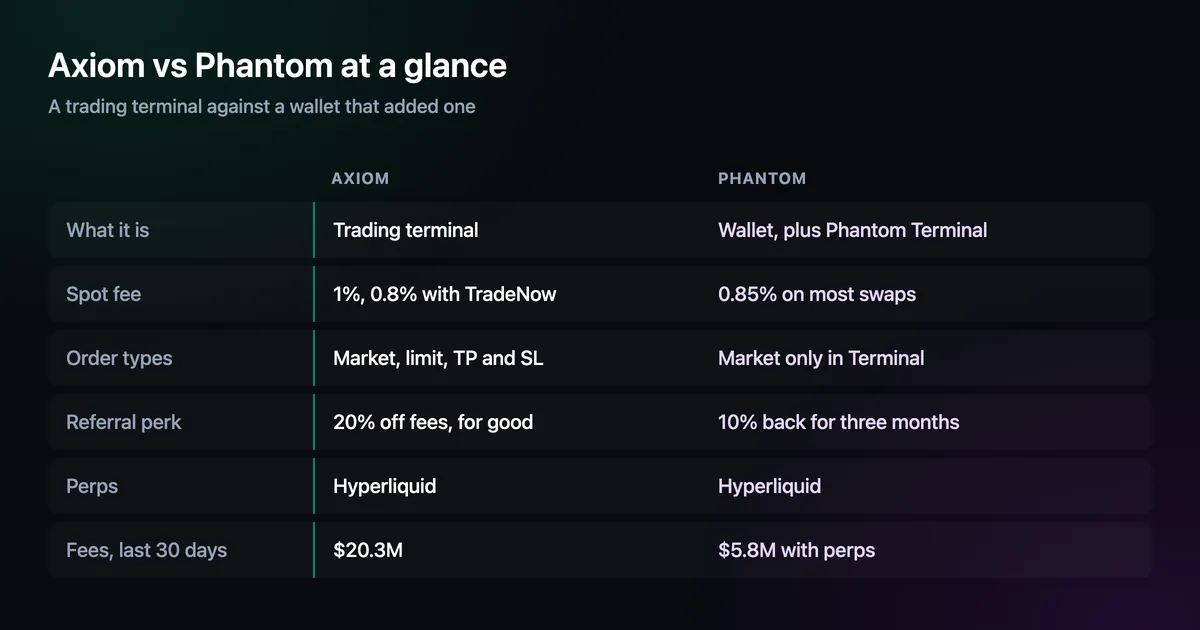
| What it is | A trading terminal | A wallet app and extension, plus Phantom Terminal on desktop |
| Spot fee | 1% base, 0.8% through TradeNow | 0.85% on most swaps |
| Referral perk | 20% off every trade, for the life of the account | 10% of your fees back for three months |
| Order types | Market, limit, take profit, stop loss | Market only in Phantom Terminal; limits in the mobile app |
| Finding new coins | Pulse launch feed with holder and dev data | Search and token security signals |
| Order landing | Presets with priority fee, bribe and MEV mode | Slippage and network fee in swap settings |
| Perps | Hyperliquid | Hyperliquid, isolated margin |
| Fees, last 30 days | $20.3M | $4.2M on swaps, $1.6M on perps |
Phantom's help centre puts its fee at 0.85% on most swaps, with bridge and network costs on top for cross-chain ones. Perps run on Hyperliquid's order book with isolated margin, so each position carries its own collateral and P&L settles in USDC. Phantom Terminal, its desktop trading screen, trades Solana tokens and those perps with TradingView charts, Quick Buy, wallet tracking and take-profit and stop-loss controls.
Two limits matter for active traders. Terminal accepts market orders only; Phantom points you to its mobile app for limit orders. And the referral perk is temporary: a code entered at sign-up in the mobile app returns 10% of your own fees for three months, paid into your Cash balance rather than taken off each trade.
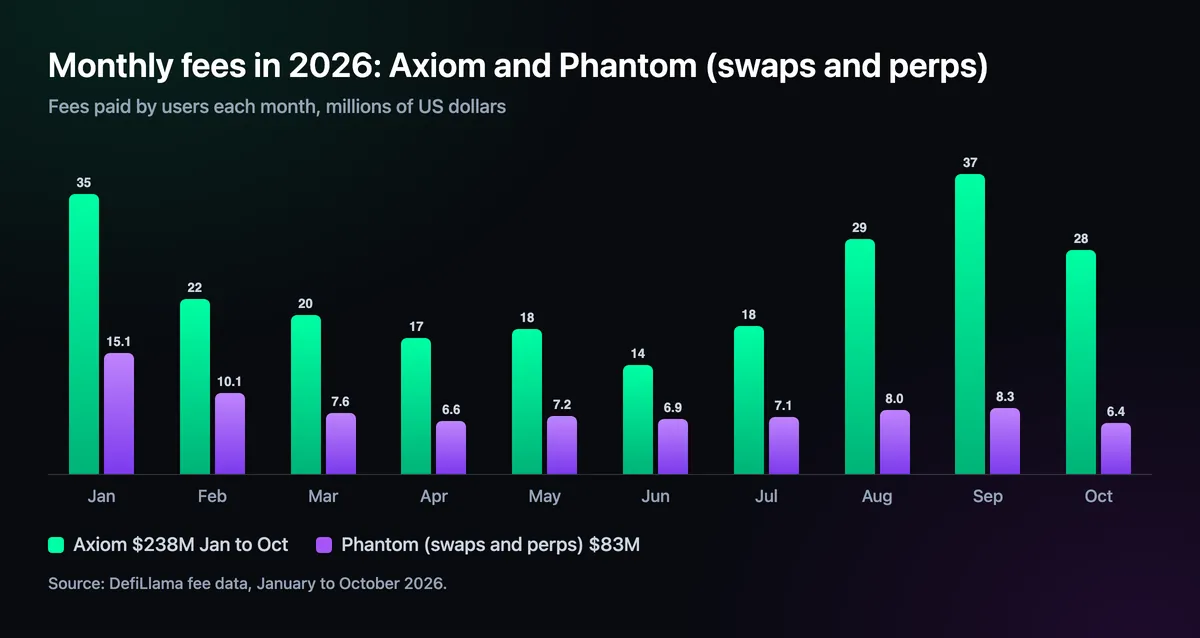
On $1,000 of swaps Phantom takes $8.50, or about $7.65 during the three months a referral rebate runs. Axiom takes $10 at its base rate and $8 with TradeNow, for as long as the account exists, and its cashback in SOL brings that lower again. Network fees are separate on both. Phantom sometimes pays them for you; on Axiom you choose the priority fee and bribe in each preset, which costs a little more on busy launches and is also why the order lands.
Holding coins, staking SOL, sending money to friends and connecting to any app: Phantom is built for all of it, on phone and desktop.
It hides likely spam tokens and simulates each transaction, warning you when the result looks wrong before you approve it.
For a one-off swap into a coin you already know, the in-app swap is quick and costs about the same as a terminal.
Limit orders, take profit and stop loss work on any token in the terminal itself, so an exit is set the moment you enter.
Pulse lists new pairs from every major launchpad with holders, dev share and bundles on the row, often before a coin shows up on a trending list.
Each preset carries slippage, priority fee, bribe and an MEV mode, and quick buys go out in one click from any list.
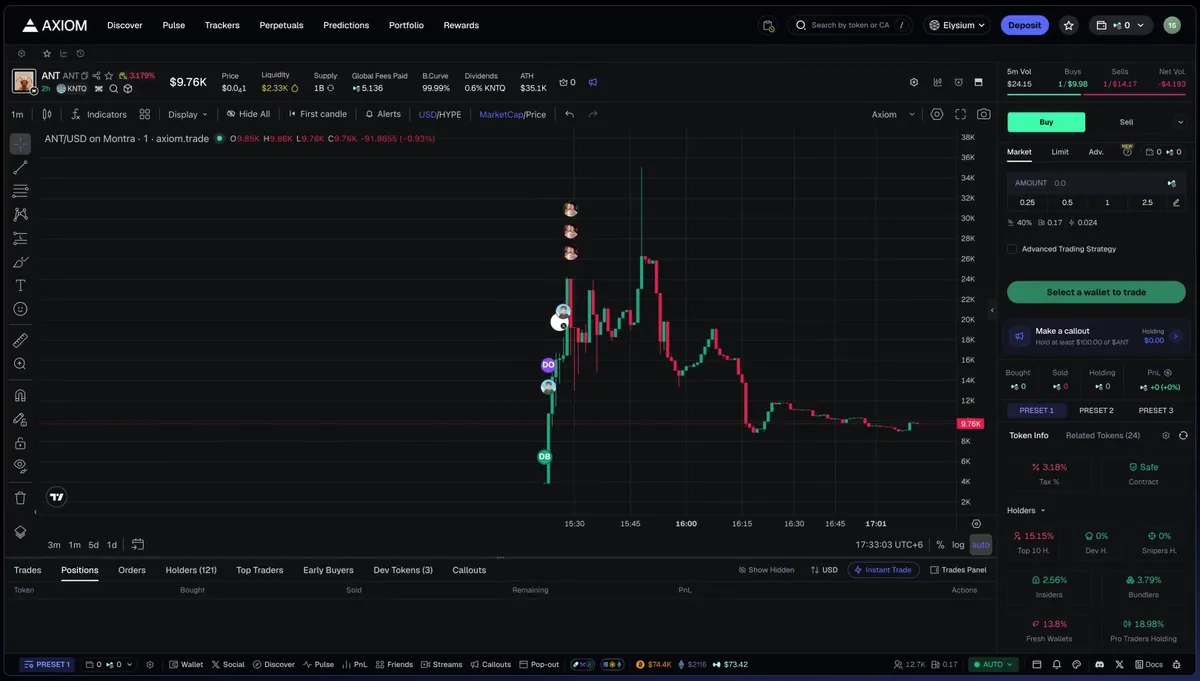
The usual setup is Phantom as the bank and Axiom as the desk. Sign in to Axiom with Phantom, send a trading amount across to your Axiom wallet, and withdraw profits back to Phantom when you are done. Your long-term coins never sit in a trading wallet, and the trades themselves get the tools and the lower fee.
Open axiom.trade/@tradenow, where TradeNow is already in the referral field, and choose Connect with Phantom.
Send SOL from Phantom to your Axiom wallet address; start with a small test amount.
A small size, a normal one and one for crowded launches, each with its own fees.
Send profits back to your Phantom address whenever you want them out of the trading wallet.
0.85% on most swaps, according to Phantom's help centre, plus network fees and, for cross-chain swaps, the bridge's own fee.
With referral code TradeNow, yes: Axiom charges 0.8% for the life of the account, against Phantom's 0.85%. Without a code Axiom's 1% is higher.
Phantom's desktop trading screen at trade.phantom.com. It trades Solana tokens and Hyperliquid perps with market orders; limit orders need the mobile app.
Yes. You can sign in to Axiom with Phantom and move SOL between the two wallets whenever you like.
Phantom's codes work only at sign-up in its mobile app and return 10% of your trading fees for three months. Axiom's code TradeNow takes 20% off every trade permanently.
Step-by-step help for every part of the terminal, from opening an account to withdrawing, with screenshots from Axiom itself.
Phantom details come from its help centre; fee totals are DefiLlama's, checked on 10 November 2026. Wallet and trading fees change, so check the confirmation screen before each trade. Not financial advice. Phantom is not involved with this site, which earns Axiom referral fees.

Written by Mohammad Shahpari · Web3 CMO, Crypto Growth & SEO Specialist · X · LinkedIn