

Axiom Trade Not Working?
When Axiom Trade is not working, the cause is usually on your side: the browser, an extension, the chain you have selected or a preset that is too tight. Real outages happen, but Axiom has no public status page, so you have to read the signs. This page sorts the common symptoms into causes and fixes, from a page that will not load to a sell that keeps failing. Accounts opened with TradeNow trade at 0.8%.
 Open Axiom (20% Off)
Axiom Trade Invite Code: TradeNow
The Axiom Trade invite code is TradeNow. Axiom calls it a referral code. Enter it when you sign up and your trading fee drops by 20% for the life of the account, from 1% to 0.8% a trade.
If you are looking for an Axiom Trade invite code, use TradeNow. Type it into the referral field on the sign-up screen, or open axiom.trade/@tradenow and it is filled in for you. It is one of the most used Axiom codes, and it still works.
Is Axiom Trade down right now?
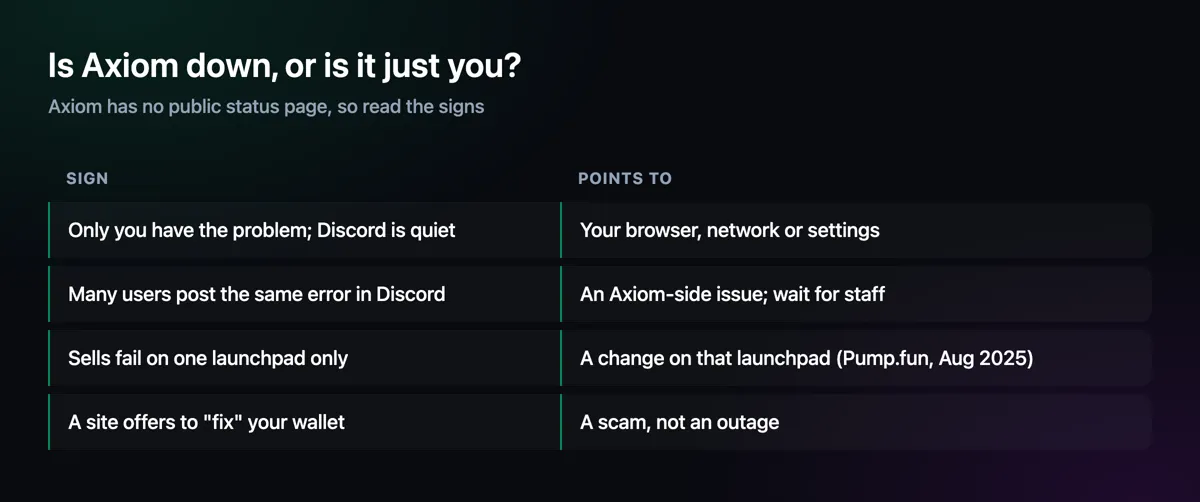
Axiom publishes no status page, so the quickest checks are its Discord server and its X account: during a real outage many users report the same error at once and staff post about it. If those are quiet and only you have the problem, it is almost always local, and the fixes below apply.
Inside the terminal, the bar at the bottom shows whether your connection is stable and which server region you are using.


Symptoms, Causes and Fixes
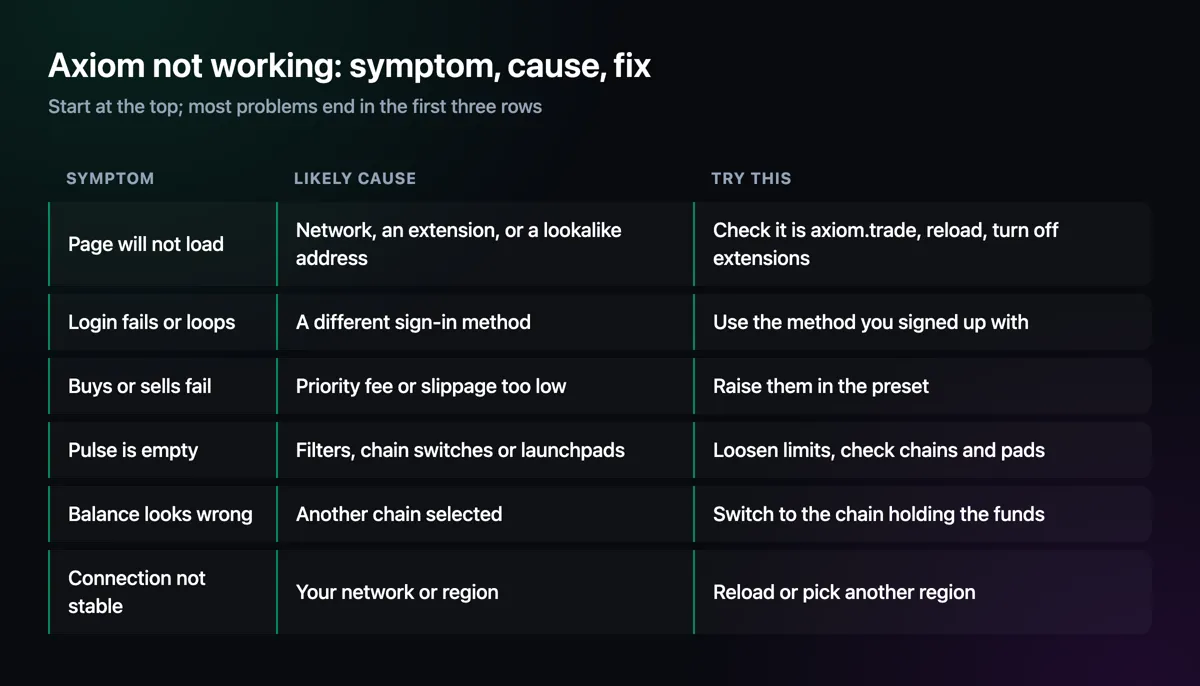
Work from the top. The first three rows cover most of what goes wrong, and none of them need support.
The Page Will Not Load
Check the address bar first: it must read axiom.trade. Lookalike sites copy the design exactly, and Britain's Financial Conduct Authority has warned about some of them. Then reload, and try a private window, which runs without most extensions. If that works, an extension is the problem. Remove any you do not need; in September 2026 the security firm Socket reported several browser extensions stealing logged-in Axiom sessions. On a phone, Axiom runs in the browser, so the same steps apply, and the Axiom app page shows how to add it to the home screen properly.
Buys and Sells That Fail
Axiom's docs give two causes for failed transactions: a priority fee too low for a busy network, and slippage too tight for a fast-moving token. Raise them in the preset you are using and try again. Secure MEV mode can be slower to land, which matters on a crowded launch; the MEV protection page explains the trade-off. If sells fail on one launchpad only, the launchpad itself may have changed something, as happened when a Pump.fun update blocked sells on Axiom for some hours in August 2025.
Login, Balances and an Empty Pulse
A login that fails usually means a different sign-in method from the one used at sign-up: email, Google and Phantom each lead to their own account. The guide on login problems covers the rest. A balance that looks wrong is often on another chain, so check the chain switch at the top. And an empty Pulse column almost always comes from filters, a switched-off chain or a launchpad left out; the Pulse page lists each check.
Never Accept a "Fix" From a Stranger
Posts about problems attract fake helpers: a DM offering to fix your wallet, a link to a "sync" or "rectify" page, an app that promises to recover a stuck trade. None of these are Axiom. Real help comes only through a ticket in Axiom's Discord, and the Axiom support page shows how to tell the difference.
Quick Checklist
Enter invite code TradeNow
Starting fresh? Create the account at axiom.trade/@tradenow with the code already in place.
Check the address
It must be axiom.trade. Bookmark it and use only the bookmark.
Try a private window
If Axiom works there, remove extensions until you find the one at fault.
Check Discord and X
If everyone reports the same problem, wait for staff rather than changing settings.
Axiom Trade Not Working — FAQ
Is Axiom Trade down?
Axiom has no public status page. Check its Discord and X account: if many users report the same error and staff post about it, it is an outage; if not, the problem is likely local.
Why is Axiom Trade not loading?
Usually a browser extension, a lookalike address or a network problem. Confirm the address is axiom.trade, reload, and try a private window without extensions.
Why do my Axiom trades keep failing?
Axiom's docs point to a priority fee too low for network traffic or slippage too tight for the token's moves. Raise both in your preset.
Why is Axiom not working on my phone?
Axiom has no store app; it runs in the phone's browser. Reload, check the address, and add it to the home screen from Safari or Chrome.
Why are my Axiom Pulse filters not working?
Filters belong to one column, and switched-off chains, launchpads, exclude keywords and imported filter sets can all hide coins. The Pulse page lists each check.
Axiom Trade Guide
Step-by-step help for every part of the terminal, from opening an account to withdrawing, with screenshots from Axiom itself.
Disclaimer
Based on Axiom's documentation, its own videos and public reports, checked on 11 November 2026. Axiom publishes no status page, so outage signs here are general guidance. Not financial advice.

Written by Mohammad Shahpari · Web3 CMO, Crypto Growth & SEO Specialist · X · LinkedIn